






Imagine it’s 5:00 PM on a Tuesday in July, and the Sacramento heat is hitting 100 degrees. You want to keep your family comfortable, but you also know that for the next three hours, SMUD is charging you $0.3765 per kWh. This is more than double the morning rate of $0.1550. We understand the frustration of choosing between a cool living room and a reasonable utility bill. Mastering the art of programming a smart thermostat for SMUD time-of-use rates is the most effective way to protect your wallet while maintaining a sanctuary for your kids and pets.
We agree that modern thermostat interfaces often feel more confusing than they should. That’s why we’ve put together this guide to help you reclaim control over your energy costs. You’ll learn exactly how to use the “pre-cooling” method to chill your home during cheaper hours so your system can rest when prices peak. We’re going to cover the best schedules for the 2026 rate cycle, how to leverage SMUD’s “My Energy Optimizer” rebates, and the maintenance steps that ensure your HVAC system stays reliable all summer long.
Key Takeaways
- Identify the specific 2026 SMUD rate windows to pinpoint exactly when electricity costs drop and when you should avoid heavy usage.
- Leverage your home’s thermal mass to store cool air during off-peak hours, allowing your living space to stay chilled through the evening peak.
- Master the technical steps for programming a smart thermostat for SMUD time-of-use rates to automate your savings and eliminate daily manual adjustments.
- Discover how simple maintenance, like checking for duct leaks, prevents your pre-cooling efforts from literally leaking out of your home.
- Select a pre-built cooling schedule tailored to your daily routine to ensure the house is comfortable the moment your family arrives home.
Understanding SMUD Time-of-Day Rates and Your Energy Bill
We’ve all felt that mid-August heat in Sacramento. When the sun beats down on your roof, your air conditioner becomes the most important piece of equipment in your home. However, it’s also the biggest driver of your monthly utility bill. As of January 1, 2026, SMUD has updated its residential rate structure to encourage energy conservation during the hours when the grid is most stressed. Understanding Time-of-Use Rates is the first step toward regaining control over your household expenses. By learning the specific windows of time when electricity is cheapest, you can protect your family’s comfort without fearing the next billing cycle.
To better understand how your thermostat plays a role in these savings, watch this helpful video from SMUD:
A central air conditioning system uses about 3.5 kilowatts per hour on average. If you manually adjust your thermostat during a heatwave, it’s easy to forget that those three hours between 5 PM and 8 PM are significantly more expensive. This “invisible cost” adds up quickly. While SMUD’s rates are roughly 47% lower than PG&E’s as of early 2026, the price jump during peak hours is still a major factor for Sacramento families. Relying on your memory to change the temperature every day is a recipe for sticker shock.
The Summer Peak Challenge: June through September
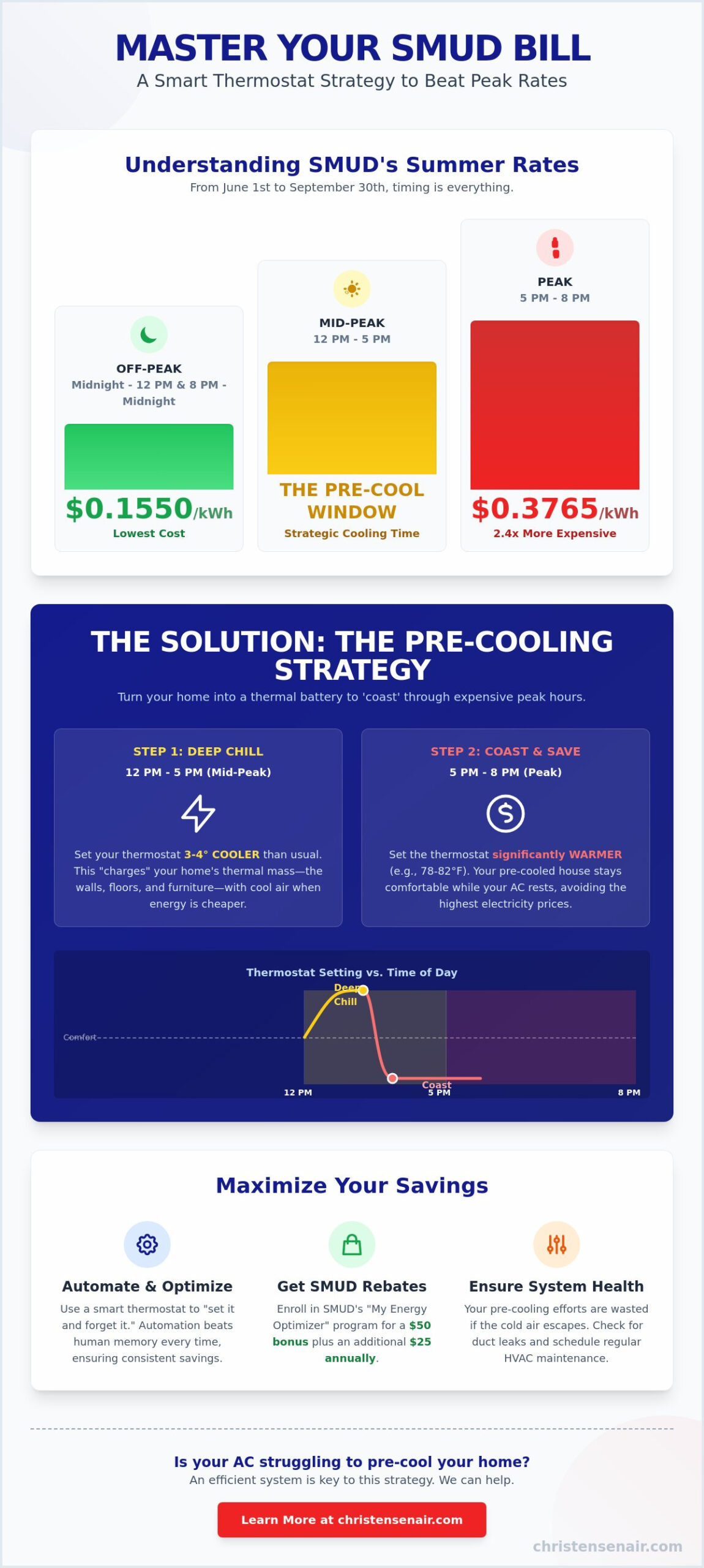
From June 1 to September 30, the price for electricity during the 5 PM to 8 PM window hits $0.3765 per kWh. This is the “Peak” period. Compare that to the “Off-Peak” morning rate of just $0.1550 per kWh, and the strategy becomes clear. We often talk to homeowners who wait for the Delta Breeze to cool their homes. While that breeze is a local treasure, it usually doesn’t arrive until after the sun goes down, often leaving you stuck in the most expensive rate window of the day. Using the right 2026 settings is no longer just a luxury; it’s a financial necessity for staying cool.
Why Your Smart Thermostat is Your Best Financial Ally
Automation beats human memory every time. When you focus on programming a smart thermostat for SMUD time-of-use rates, you’re building a “set-it-and-forget-it” shield for your wallet. These devices can also enroll in SMUD’s “My Energy Optimizer” program, which offers a $50 enrollment bonus and an annual $25 reward. The program allows SMUD to make minor, automatic adjustments on the hottest days to stabilize the grid. To see how these smart features interact with your home’s mechanical systems, you can read our guide on what is HVAC to learn more about system communication and efficiency.
The Art of Pre-Cooling: How to Beat the 5 PM Price Spike
We want to share a strategy that many energy experts in the Central Valley use to keep their homes comfortable without overspending. It is called pre-cooling. This technique turns your house into a thermal battery, storing cold air when electricity is cheaper so you don’t have to run your system when prices are at their highest. Mastering the art of programming a smart thermostat for SMUD time-of-use rates starts with understanding that your air conditioner doesn’t just cool the air; it cools your entire home’s structure.
Every object in your home, from the drywall to the sofa, has “thermal mass.” When you run your air conditioner, these objects soak up the cold. If you wait until 5 PM to start cooling, your AC has to work twice as hard to remove heat from these surfaces while fighting the outdoor temperature. By shifting your cooling schedule earlier, you allow these materials to stay chilled, which helps your home “coast” through the expensive evening hours. If you notice your home isn’t holding that coolness well, it might be due to aging equipment. Our team can help with a professional air conditioning installation to ensure your home stays a sanctuary all summer long.
Setting Your Pre-Cooling Window
The goal is to deeply chill your home during the Mid-Peak window, which runs from 12 PM to 5 PM. We recommend setting your thermostat to a “Deep Chill” temperature that is 3 to 4 degrees lower than your usual comfort level. For example, if you like it at 74°F, set your smart thermostat to 70°F or 71°F starting at noon. This ensures the thermal mass of your home is fully charged before the SMUD Time-of-Day (5-8 p.m.) Rate takes effect. You can also turn on ceiling fans during this time to help circulate that crisp air more effectively throughout the house.
The “Coast” Period: Staying Comfortable Until 8 PM
At exactly 5 PM, your smart thermostat should be programmed to raise the target temperature to 78°F or higher. Because you spent the afternoon pre-cooling, your home’s internal temperature will rise very slowly. Most well-maintained homes won’t even reach 78°F before the peak period ends at 8 PM. To help your home coast even longer, we suggest following these simple steps:
- Close all blinds and heavy curtains by 10 AM to block out the direct Sacramento sun.
- Avoid using the oven or dishwasher until after 8 PM to keep internal heat gain at a minimum.
- Check the outdoor temperature at 8 PM; if the Delta Breeze has arrived, open the windows to let nature take over.
By using this logic, your air conditioner stays mostly silent during those three expensive hours, protecting your budget while your family stays perfectly relaxed.
Programming Your Specific Smart Thermostat for SMUD
Setting up your device correctly is the bridge between knowing the rates and seeing lower bills. According to the U.S. Department of Energy, homeowners can save as much as 10% a year on heating and cooling by simply adjusting their thermostat settings for eight hours a day. When programming a smart thermostat for SMUD time-of-use rates, you first need to ensure your home location is set accurately in your device’s app. This allows the hardware to sync with Sacramento’s local time and weather data, ensuring your schedule triggers exactly when the rates change.
We also suggest disabling any “Auto-Learning” or “Adaptive” features that might contradict your manual strategy. While these features are designed for convenience, they often prioritize immediate comfort over the specific 5 PM to 8 PM peak price spike. Once your schedule is set, make it a habit to check your energy history every Sunday. If you see your air conditioner running during the expensive 5 PM window, it’s time to refine your setpoints.
Google Nest: Learning vs. Manual Schedules
Nest thermostats are popular in Sacramento, but their “Auto-Schedule” feature can sometimes work against you. We recommend going into the Nest app and clearing out any learned setpoints that fall within the peak window. Instead, create manual entries for 12 PM to start your pre-cooling and 5 PM to begin your coasting period. You should also disable the “Early-On” feature. This prevents the system from starting a heavy cooling cycle at 4:45 PM just to reach a target temperature by 5:00 PM, which is when the most expensive rates begin.
ecobee: Using “Comfort Settings” for TOU
The ecobee system is excellent for managing time-of-use rates because of its “Comfort Settings.” We suggest creating two custom profiles named “Pre-Cool” and “Peak Coast.” Assign the Pre-Cool profile to run from 12 PM to 5 PM at a lower temperature. Then, set the Peak Coast profile to take over at 5 PM with a higher setpoint. If you use remote sensors, place them in the rooms your family uses most. This ensures the ecobee prioritizes those specific areas during the afternoon deep chill.
Sensi and Honeywell: Traditional Scheduling Tips
For Sensi and Honeywell users, the 7-day scheduling option is your best friend. This allows you to set a different plan for weekends when SMUD rates are off-peak all day. Ensure your Sensi is connected to the My Energy Optimizer program within the app settings to stay eligible for your 2026 rewards. If your home feels a bit stuffy during the 5 PM to 8 PM window, use the “Circulate” fan mode. This moves air throughout the house to maintain comfort without engaging the expensive compressor.
SMUD Savings Templates: Schedules for Every Lifestyle
We know that every Sacramento household has a different rhythm. A family with young children at home all day has different cooling needs than a couple who works in an office until 6 PM. The beauty of programming a smart thermostat for SMUD time-of-use rates is the ability to tailor your energy savings to your specific routine. By using the following templates, you can stop worrying about manual adjustments and trust that your home will stay comfortable without a surprise on your next bill.
To apply these templates, simply open your thermostat app and create new schedule entries for the specific times listed. If your system seems to struggle reaching these target temperatures during the afternoon, it might be a sign of a mechanical issue. We recommend signing up for our Comfort Club Maintenance Plan to ensure your air conditioner is healthy enough to handle the demands of a pre-cooling schedule.
The Working Professional Template
This schedule is designed for those who are out of the house during the morning and early afternoon. It prioritizes saving money while the house is empty and then aggressively cooling it down just before the 5 PM peak price jump begins.
- 8 AM – 12 PM: 78°F. This saves energy while you are away during the off-peak morning hours.
- 12 PM – 5 PM: 72°F. This is your aggressive pre-cooling window. It ensures your walls and furniture are chilled before the $0.3765 per kWh rate kicks in.
- 5 PM – 8 PM: 80°F. Your home will coast through the peak period using the “cold” stored in its structure.
- 8 PM – Bed: 74°F. Return to your preferred comfort level once the rates drop back down to mid-peak levels.
The Work-from-Home Comfort Balance
If you spend your day in a home office, you can’t let the house get too hot without losing productivity. This template provides a steady environment while still preparing for the evening price spike.
- 9 AM – 2 PM: 75°F. Maintains a professional and comfortable environment for meetings and focused work.
- 2 PM – 5 PM: 71°F. A rapid pre-cooling phase to prepare for the 5 PM “coast” period.
- 5 PM – 8 PM: 78°F. A moderate coasting temperature that keeps the office from getting stuffy while the AC stays off.
This approach ensures you stay sharp and productive during your work hours while still taking full advantage of the cheaper mid-day electricity rates.
The “Energy Saver” Aggressive Template
For homeowners focused on the lowest possible monthly bill, this template pushes the boundaries of pre-cooling. It involves dropping the temperature to 68°F during the 12 PM to 5 PM window and setting the thermostat to 82°F during the peak. While this requires wearing a sweater in the afternoon, it almost guarantees your air conditioner won’t click on once during the most expensive three hours of the day.
Beyond the Screen: Optimizing Your HVAC for Maximum Savings
While mastering the digital side of programming a smart thermostat for SMUD time-of-use rates is essential, your efforts will fall short if your mechanical system isn’t up to the task. We often see homeowners set the perfect schedule only to find their bills remain high. This usually happens because the air conditioner is struggling against physical barriers like clogs or leaks. To truly protect your family’s comfort and your monthly budget, you must ensure the entire system is operating at peak efficiency. A smart schedule is only as good as the equipment carrying it out.
Why a Dirty Filter Negates Your Programming
A clogged air filter is the most common reason a pre-cooling strategy fails. When airflow is restricted, your air conditioner has to run for much longer periods to reach your 71°F target during the mid-day window. This extra run time increases energy consumption and puts unnecessary strain on your compressor. We recommend checking your filter every 30 days during the peak summer months. For more tips on maintaining a healthy home environment and choosing the right filtration, you can read our indoor air quality guide. Before the summer heat arrives, working through a pre-season AC maintenance checklist for Roseville homeowners can help you catch filter issues and other potential problems before they undermine your TOU savings strategy.
The Role of Duct Integrity in TOU Savings
Your “coasting” period from 5 PM to 8 PM relies entirely on your home’s ability to hold onto cold air. If your ductwork has gaps or tears, you are effectively paying to cool your attic or crawlspace instead of your living room. This loss of pressure means your home warms up faster, forcing your thermostat to kick the AC back on during the most expensive hours of the day. If you notice uneven cooling or excessive dust, it might be time for a duct system replacement in Roseville. Sealing these leaks ensures that every penny you spend on electricity actually contributes to your household’s sanctuary.
Professional Calibration and the Comfort Club
At Christensen Heating and Cooling, we take personal pride in helping our neighbors navigate the complexities of local utility rates. Our technicians don’t just repair parts; we calibrate your entire system to work in harmony with your smart settings. By joining our Comfort Club Maintenance Plan, you receive two precision tune-ups a year. This prevents the “Peak Hour Breakdowns” that always seem to happen on the hottest 105-degree days. We treat every client’s home as if it were our own, ensuring you have total peace of mind throughout the summer. To keep your condenser running efficiently all season long, review our complete guide to outdoor AC unit maintenance in Roseville before the summer peak arrives. Schedule your seasonal AC tune-up today!
Take Control of Your Summer Comfort and Savings
We’ve explored how a strategic approach to your home’s cooling can transform your summer experience in Sacramento. By using the pre-cooling method during the cheaper mid-day hours, you can effectively coast through the $0.3765 per kWh peak window. Remember that programming a smart thermostat for SMUD time-of-use rates is your most powerful tool for automating these savings. However, even the most advanced schedule won’t work if your air conditioner is struggling with a clogged filter or leaky ducts. Mechanical health and smart programming must work together to protect your wallet.
Christensen Air has been family-owned and operated since 2009. We take pride in providing expert calibration for SMUD and PG&E rate structures to help our neighbors in Roseville, Rocklin, and the greater Sacramento area stay comfortable. We treat your home as if it were our own, ensuring your HVAC system remains a reliable sanctuary for your family throughout the hottest months of the year.
Join the Christensen Comfort Club for peak energy efficiency!
You now have the exact blueprint to beat the heat and the high rates. We’re here to support you with the local expertise and neighborly care you deserve.
Frequently Asked Questions
What are the SMUD peak hours for summer 2026?
The summer peak hours for 2026 are 5:00 PM to 8:00 PM on weekdays. These specific rates are in effect from June 1 through September 30. During weekends and major holidays like Independence Day and Labor Day, all hours are billed at the lower off-peak rate. This provides a great opportunity to catch up on laundry or heavy cooling without the $0.3765 per kWh peak price.
Will pre-cooling my house actually save me money?
Yes, pre-cooling is a proven strategy to lower your summer utility bills. By shifting your cooling to the morning or early afternoon, you use electricity that costs between $0.1550 and $0.2139 per kWh. This prevents your air conditioner from running during the expensive $0.3765 peak window. This simple shift in timing is the core benefit of programming a smart thermostat for SMUD time-of-use rates.
Is it cheaper to leave my AC at one temperature all day?
It is not cheaper to maintain a constant temperature all day. Your home gains heat faster when the temperature difference between the inside and outside is large. By allowing the indoor temperature to rise during peak hours or when you are away, you actually slow down the rate of heat entering your home. This results in less total work for your air conditioner and lower energy consumption overall.
How do I join the SMUD My Energy Optimizer program?
You can enroll in the My Energy Optimizer program through the SMUD website or directly within your thermostat’s mobile app. As of May 2026, SMUD offers a $50 prepaid Mastercard as an enrollment bonus for eligible devices. Participants also receive an annual $25 reward for staying in the program each summer. It is a great way to earn money while helping to stabilize our local power grid.
What is the best temperature to set my AC during the 5-8 PM peak?
We recommend setting your thermostat to 78°F or higher during the peak evening window. If you have successfully pre-cooled your home to 71°F or 72°F earlier in the afternoon, your house will stay comfortable for several hours. The thermal mass of your furniture and walls will keep the air feeling crisp even while the air conditioner stays off during the most expensive part of the day.
Does my smart thermostat automatically adjust for SMUD rates?
Most devices require you to manually enable utility features before they will adjust for local rates. You must enter your zip code and select SMUD as your provider in the device settings. Once this is done, the thermostat can sync with the 2026 rate schedule. However, we still suggest reviewing your manual schedule to ensure it aligns perfectly with your family’s specific needs and comfort levels.
What happens if I override my smart thermostat schedule during a peak event?
You always have complete control over your thermostat and can override a peak event at any time. If the house feels too warm, simply adjust the temperature to your liking. SMUD allows you to opt out of these events whenever you choose. You will still remain eligible for your $25 annual reward as long as you don’t completely unenroll from the My Energy Optimizer program.
Can a smart thermostat help with my winter heating bills from SMUD?
Smart thermostats are very effective for managing winter costs. From October 1 through May 31, SMUD charges a peak rate of $0.1776 per kWh between 5:00 PM and 8:00 PM. Programming a smart thermostat for SMUD time-of-use rates during the winter allows you to shift your heating load to off-peak hours when the price drops to $0.1285. This ensures your home stays cozy for less all year long.